Thirty minutes after the Cursor 3 announcement hit Hacker News, the top comment wasn't about a feature. It was a plea. "I wish they'd keep the old philosophy of letting the developer drive and the agent assist," one user wrote. "I still want to code, not vibe my way through tickets."
A Cursor engineer responded within minutes: the IDE still exists. The new Agents Window is a separate surface. You can use both simultaneously or ignore it entirely.
Both are telling the truth. And both are talking past each other. That disconnect is the real story of Cursor 3: not what features shipped, but what Anysphere believes about where software development is going, and whether developers agree.
🦸🏻♀️ If this helps you ship better AI systems:
Before you can understand Cursor 3, you need to understand the essay that predicted it.
On February 26, 2026, Cursor CEO Michael Truell published "The Third Era of AI Software Development." The argument was simple and sweeping. Era one: Tab autocomplete. Developers type, the model predicts the next line. Era two: synchronous agents. Developers describe a task, the agent executes it while they watch. Era three (arriving now): autonomous agent fleets. Developers define the problem, spin up agents, and review artifacts when the work is done.
The data Cursor shared to back this up is striking. Agent usage in Cursor grew 15x in a single year. In March 2025, there were roughly 2.5 Tab users for every agent user. By early 2026, that ratio flipped: 2 agent users for every Tab user. The Tab era lasted nearly two years. Truell's claim: the synchronous agent era "may not last one."

Screenshot source: cursor.com/blog/third-era — "Agents become mainstream and then the default" chart. Capture this screenshot from the blog post.
Inside Cursor itself, 35% of merged PRs now come from agents operating autonomously in cloud VMs. Not agents supervised by a developer in real time. Agents that cloned a repo, worked in isolation, and produced a merge-ready pull request.
Here's why this matters for the product: if your users are spending less time typing code and more time reviewing agent output, then your VS Code fork (built around the assumption that developers type code) is the wrong surface. The interface needs to change. Not because the old one is broken, but because the user's job is changing underneath it.
That's the thesis. Now look at what Cursor shipped in March 2026, and it stops looking like a feature roadmap. It starts looking like a construction plan for a new kind of tool.
Read the Cursor changelog for March 2026 as a single document and a pattern emerges. Five releases in 28 days, each one building on the last. Not a feature drip. A platform buildout.
March 5: Automations. Event-driven agents. You define a trigger (a Slack message, a GitHub event, a Linear ticket, a PagerDuty alert, a cron schedule) and a set of instructions. When the trigger fires, Cursor spins up a cloud sandbox, the agent follows your instructions using whatever MCP tools and models you've configured, and it keeps a memory of past runs to improve over time. This is the trigger layer.
March 11: Marketplace. 30+ plugins from Atlassian, Datadog, GitLab, Glean, Hugging Face, monday.com, PlanetScale, and others. These aren't IDE extensions. They're MCP-based tool integrations that agents (not humans) use during execution. This is the tool layer.
March 19: Composer 2. Cursor's own frontier coding model, built through continued pretraining on Kimi K2.5 and scaled reinforcement learning. It scores 61.7 on Terminal-Bench 2.0 and 73.7 on SWE-bench Multilingual. This is the brain layer.
March 25: Self-hosted cloud agents. The enterprise answer to "where does my code run?" Same capabilities as Cursor-hosted agents but running inside your own infrastructure. This is the runtime layer.
April 2: Cursor 3 / Agents Window. The interface that ties all four layers together. This is the surface layer.
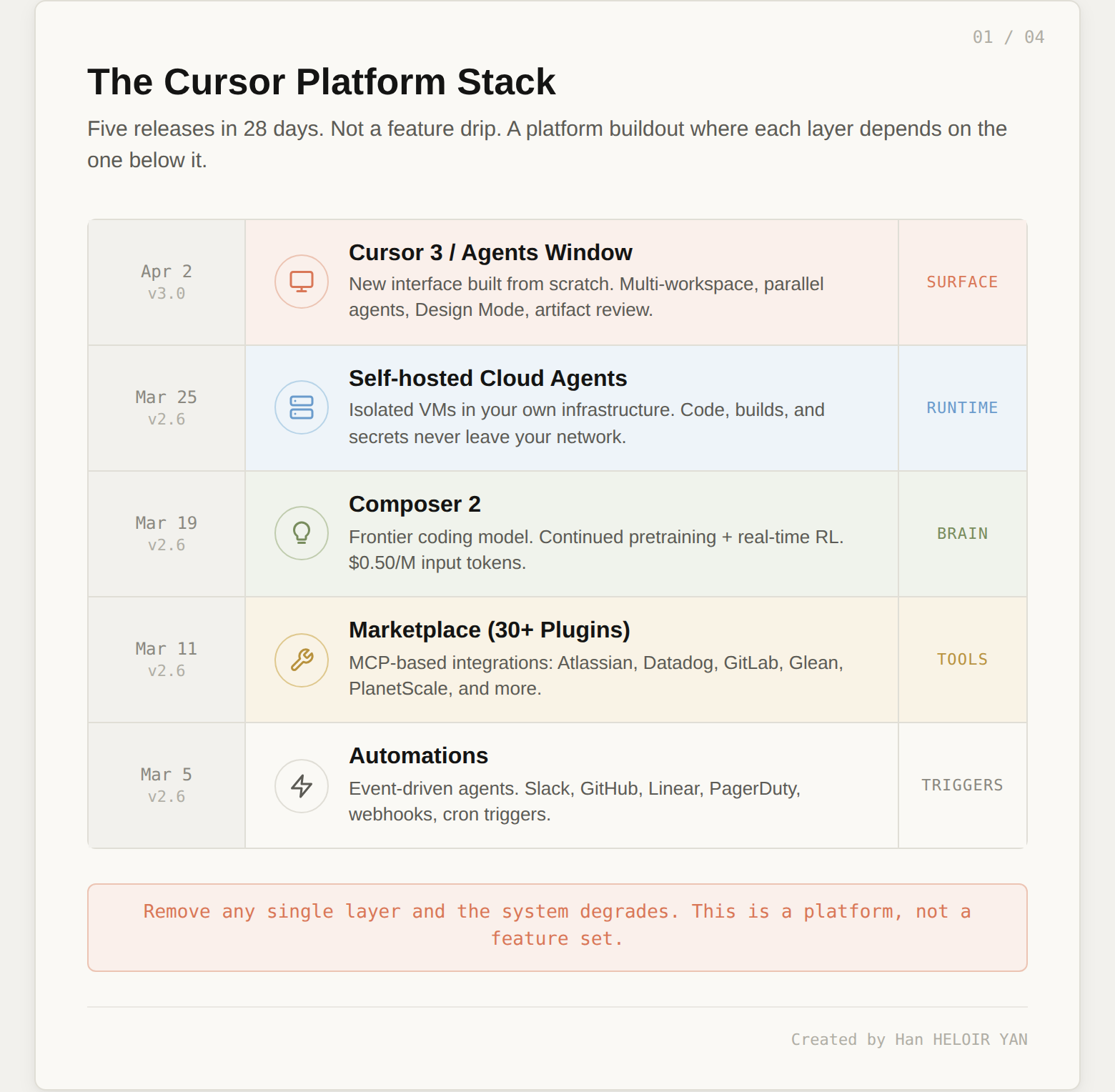
Image by Author — The five March releases as five layers of a single architecture. The Agents Window isn't a standalone feature. It's the control surface for a system that already existed underneath.
The sequence matters because each layer depends on the one below it. The Agents Window is useful because cloud agents exist. Cloud agents are useful because Composer 2 gives them a fast, capable brain. The brain is useful because the marketplace gives it tools. The tools are useful because automations give them triggers. Remove any single layer and the system degrades.
This is not how you ship features. This is how you build a platform.
Here's the most architecturally significant detail in the Cursor 3 announcement, buried in a single sentence of the blog post: "With Cursor 3, we took that a step further by building this new interface from scratch, centered around agents."
From scratch. Not another panel in the VS Code fork. Not a sidebar extension. A new application, built from the ground up.
VS Code is built around what you might call the file-editor-terminal triad. You have a file tree on the left. An editor in the center. A terminal at the bottom. Extensions communicate through the Extension Host API, which gives them controlled access to the editor surface, file system, and some UI primitives. The entire model assumes a single workspace, a single human, and a linear workflow: open file, edit, save, run, debug.
Multi-workspace parallelism. You need agents working across different repos simultaneously. VS Code opens one workspace at a time.
Cloud/local session handoff. You need to start an agent locally, push it to the cloud to keep running while you close your laptop, then pull it back to local when you want to test. VS Code has no concept of session migration.
Artifact-based review. Cloud agents produce demos, screenshots, video recordings, and live previews. VS Code's review model is built around file-level diffs.

Screenshot source: cursor.com/blog/cursor-3 — Agents Window main interface. Notice what's missing: the file tree. The primary object is an agent, not a file. Capture this from the blog post or your own Cursor 3.
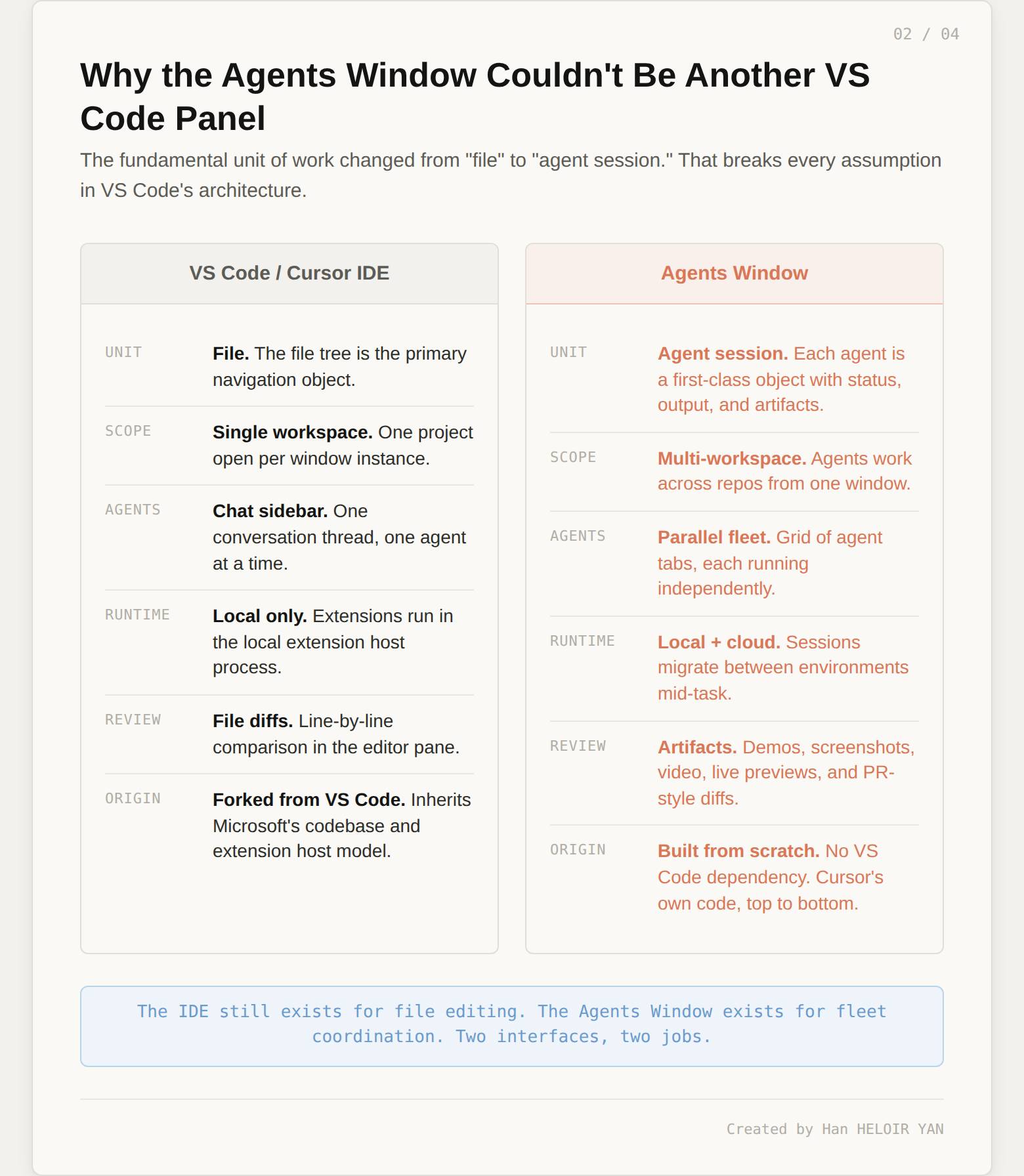
Image by Author — Why the Agents Window couldn't be another VS Code panel. The fundamental unit of work changed from "file" to "agent session."

Screenshot source: cursor.com/changelog/3-0 — Agent Tabs in grid view. This layout borrows from CI/CD dashboards, not IDEs. Capture this from the changelog.
If any single feature reveals the philosophical shift, it's Design Mode. Open the Agents Window, toggle Design Mode with Cmd+Shift+D, and you can annotate UI elements directly in the browser. Shift-drag to select an area. Cmd+L to add an element to the agent chat.

Screenshot source: Your own Cursor 3 instance — Design Mode. You're not writing CSS. You're pointing at a button and telling an agent to fix it.
You are not editing code. You are not reading a file. You are pointing at a visual element and describing what you want changed, and an agent translates that into implementation. This interaction has no equivalent in any IDE because it isn't an IDE interaction. It's a management interaction.
The new slash commands reinforce this. /worktree creates an isolated git worktree so the agent's changes happen in a separate branch, leaving your main branch untouched until you explicitly apply the result.
/best-of-n goes further. Type /best-of-n sonnet, gpt, composer fix the flaky logout test and Cursor spins up three separate worktrees, runs the same prompt across Sonnet, GPT, and Composer simultaneously, then surfaces a parent agent that compares all three outputs. You see the results side by side in Agent Tabs. The parent agent provides commentary on the differences and can merge the best parts of each implementation into a single commit. You can configure per-project worktree setup (dependency installation, environment files, migrations) through .cursor/worktrees.json.
This is not an editing feature. It's a model evaluation pipeline embedded directly in the developer's workflow. The closest equivalent in traditional engineering would be running the same spec through three different consulting firms and comparing proposals. That's a management pattern, not a coding pattern.
There's a pragmatic reason for building from scratch too. Microsoft started blocking proprietary extensions in VS Code forks in 2025, forcing Cursor to scramble and reimplement open-source alternatives. The Agents Window reduces Cursor's exposure. If Microsoft tightens the screws further, the Agents Window is unaffected. It's Cursor's own code, top to bottom.
Cursor isn't making this bet alone. Every major player in AI dev tooling is answering the same question: when agents write the code, what does the developer look at?
GitHub Copilot says: the IDE is enough. Add agent features through extensions. The bet: you can bolt agent capabilities onto the existing surface.
Cursor (IDE mode) says: the IDE needs deeper hooks than extensions allow. Fork VS Code, control the rendering pipeline. The bet: the developer still drives, but the AI is the best copilot possible.
Cursor (Agents Window) says: the IDE is a secondary surface. Build a new interface from scratch for managing agent fleets. The bet: the developer becomes a coordinator.
Claude Code says: no UI at all. A terminal tool with a 1M token context window. The bet: the interface is irrelevant. Agent intelligence is the only thing that matters.
Devin / Cognition says: fully autonomous. The agent works independently from problem to shipped PR. After acquiring Windsurf for $250M, Cognition is building toward agents that don't need a human watching.
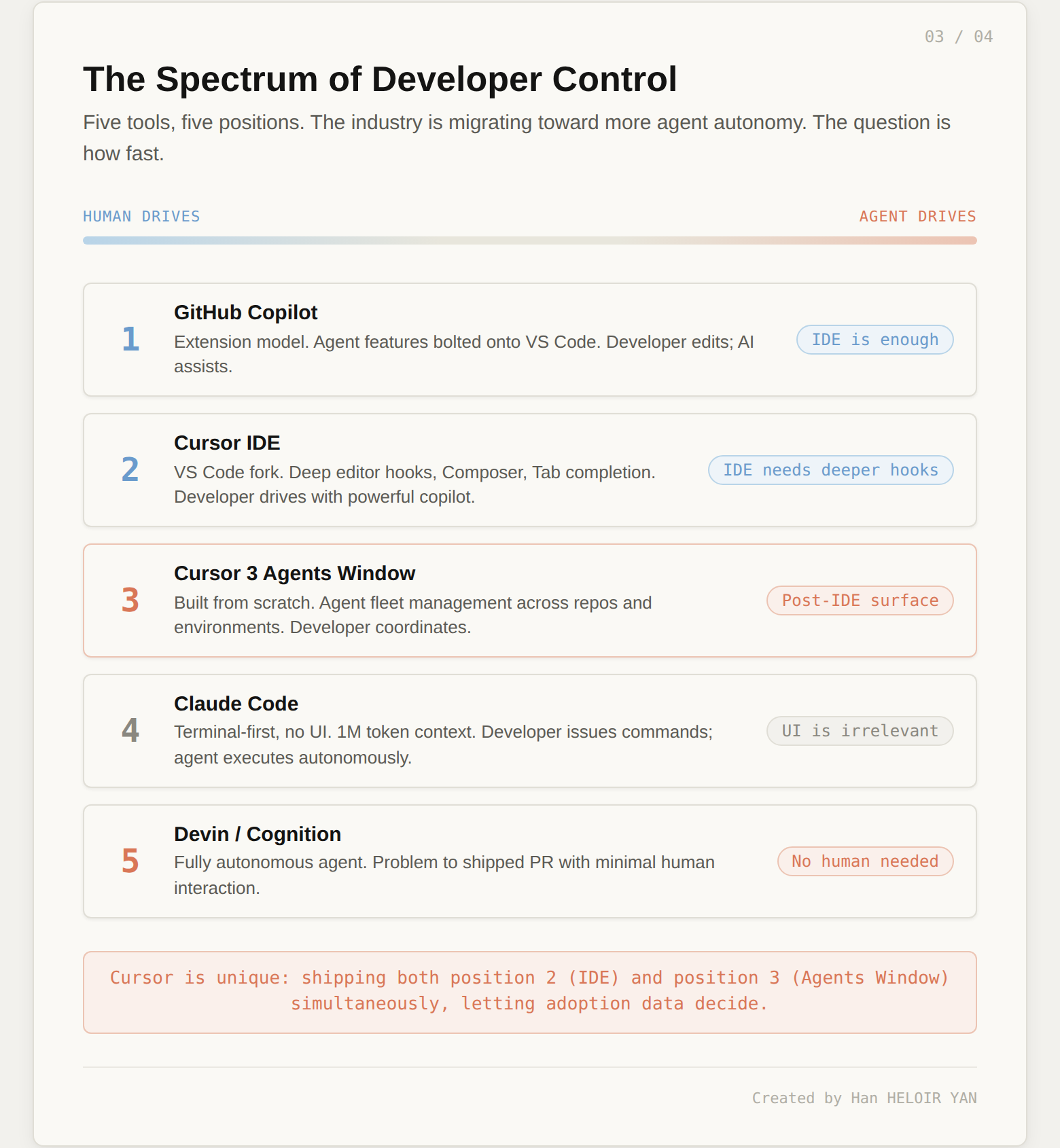
Image by Author — Five tools, five positions on the spectrum. The industry is migrating toward more agent autonomy. The question is how fast.
Cursor's unique position: they're shipping both the era-two tool (the IDE) and the era-three tool (the Agents Window) simultaneously, letting adoption data decide which one wins.
Before the philosophical debate, here's the practical walkthrough. Every feature below works right now in Cursor 3.
Cmd+Shift+P → type "Agents Window" → Enter. A new window opens alongside your IDE. You can keep both open or switch between them. The Agents Window is additive: your IDE stays exactly as it was.
In the Agents Window, open two agent tabs (click the + icon or Cmd+T). In Tab 1, type a task against one repo. In Tab 2, type a different task (same repo or a different one). Both agents run simultaneously. The sidebar shows their status: running, waiting, completed.
Type /best-of-n sonnet, gpt, composer fix the flaky logout test. Cursor creates three worktrees, runs the same prompt across all three models in parallel, and a parent agent compares the outputs. You see all three results in Agent Tabs. Pick the best, or ask the parent agent to merge the strongest parts into one commit.
Type /worktree refactor the auth middleware. Cursor creates a separate git worktree. The agent works there, leaving your main branch untouched. When you're satisfied, /apply-worktree merges the changes back. Configure project-specific setup (deps, .env files, migrations) in .cursor/worktrees.json.
Start an agent locally. Mid-task, click the cloud icon to push it to a cloud VM. Close your laptop. The agent keeps working. Come back later, pull the session back to local, and test the changes on your machine. Session history and working tree travel with it.
Cloud agents aren't limited to the desktop app. Start them from cursor.com/agents on the web, from your phone, from Slack (mention @Cursor), from GitHub (via automations), or from Linear. All sessions appear in your Agents Window sidebar.
In the Agents Window, press Cmd+Shift+D to toggle Design Mode. Your integrated browser activates. Shift+drag to select a UI area. Cmd+L to add the selected element to the agent chat. Describe what you want changed. The agent translates your visual feedback into code.
The agent can open, navigate, and interact with local websites directly in the built-in browser. It captures screenshots, reads DOM nodes, and monitors console output. Paste a design mockup and ask the agent to match it. Screenshot a bug and ask the agent to investigate.
Visit cursor.com/marketplace. Install plugins with one click. Agents gain access to Atlassian, Datadog, GitLab, Glean, PlanetScale, and 30+ other tools via MCP. Cloud agents can use these plugins during automated runs triggered by Slack, GitHub, or cron schedules (set up at cursor.com/automations).
When an agent finishes, the Agents Window shows its output: diffs in a PR-style view, screenshots of UI changes, and (for cloud agents) video recordings and live previews of the running app. Stage, commit, and create PRs without leaving the window. Dive into any file the agent touched using the built-in editor with full LSP support (go-to-definition, diagnostics, symbol search).
Admins can disable "Made with Cursor" code attribution across the team, restrict secret management to admins only, and get human-readable audit logs with directory group names. Third-party plugin imports default to off for enterprise accounts.
Now we arrive at the conflict that makes Cursor 3 interesting, not as a product but as a thesis about the future.

Screenshot source: cursor.com/blog/cursor-3 — Both interfaces coexist. But only one got the keynote. Capture from the blog post or your own Cursor 3.
The Hacker News thread from April 2 is worth reading in full because it captures a tension that press coverage and feature comparisons miss entirely.
One developer: "Even when I'm using AI agents to write code, I still find myself spending most of my time reading and reasoning about code. Showing me little snippets of my repo in a chat window does not help with this."
Another: "AI labs think they're building an autonomous replacement for software engineers, while software engineers see these systems as tools to supplement the process of software engineering."
A third, more bluntly: "Agent is where tokens are consumed, and where they can charge you more."
These aren't uninformed reactions. They're senior engineers articulating three distinct concerns.
The craft concern. Understanding code by reading it, tracing logic, building a mental model of the system: this is how experienced engineers produce reliable software. An interface that abstracts away the code makes that harder, not easier.
The autonomy concern. "Agent fleets" sounds like a productivity gain until you realize what it implies about the developer's role. You're no longer the person who writes the solution. You're the person who describes the problem, spins up workers, and reviews their output. For many experienced engineers, that feels less like promotion and more like a shift from craftsperson to middle manager.
The incentive concern. Cursor's credit-based pricing model charges for agent usage. More agents, more tokens, more revenue. The business model and the product direction point in the same direction.

Screenshot source: cursor.com/changelog/3-0 — The diffs view looks like a GitHub PR review, not a file diff in an editor. Capture from changelog.
Here's what the backlash gets right: the assumption that more agents equals more productivity is unproven at scale. "Shipping more" is not the same as "building better." The quality question is the one nobody in this space has answered yet.
Here's what the backlash gets wrong: the direction of travel. The Tab-to-agent flip already happened. Agent usage isn't growing because Cursor is pushing it. It's growing because the models got good enough. Resisting the agent-first workflow is like resisting autocomplete in 2022: you can do it, and you'll be less productive than the developer next to you who didn't.
The honest answer is that both sides are right. Agents will write most code. And we don't yet know what we lose when they do.
If you're evaluating Cursor 3 specifically: the Agents Window is optional. Open it with Cmd+Shift+P → Agents Window. Use it for a week alongside the IDE. Watch your own behavior. If you find yourself spending more time reviewing agent output than writing code, the Agents Window is the interface designed for that workflow.
If you're an architect thinking about team workflows: the interesting question isn't "Cursor or Claude Code?" It's "what does your development process look like when 50%+ of PRs come from agents?" That question has implications for testing infrastructure, review processes, and environment management.
If you're an engineering manager thinking about tooling budget: every tool in this space is converging on token-based pricing. Budget for 3-5x your current AI tooling spend within 12 months if you adopt agent-first workflows.
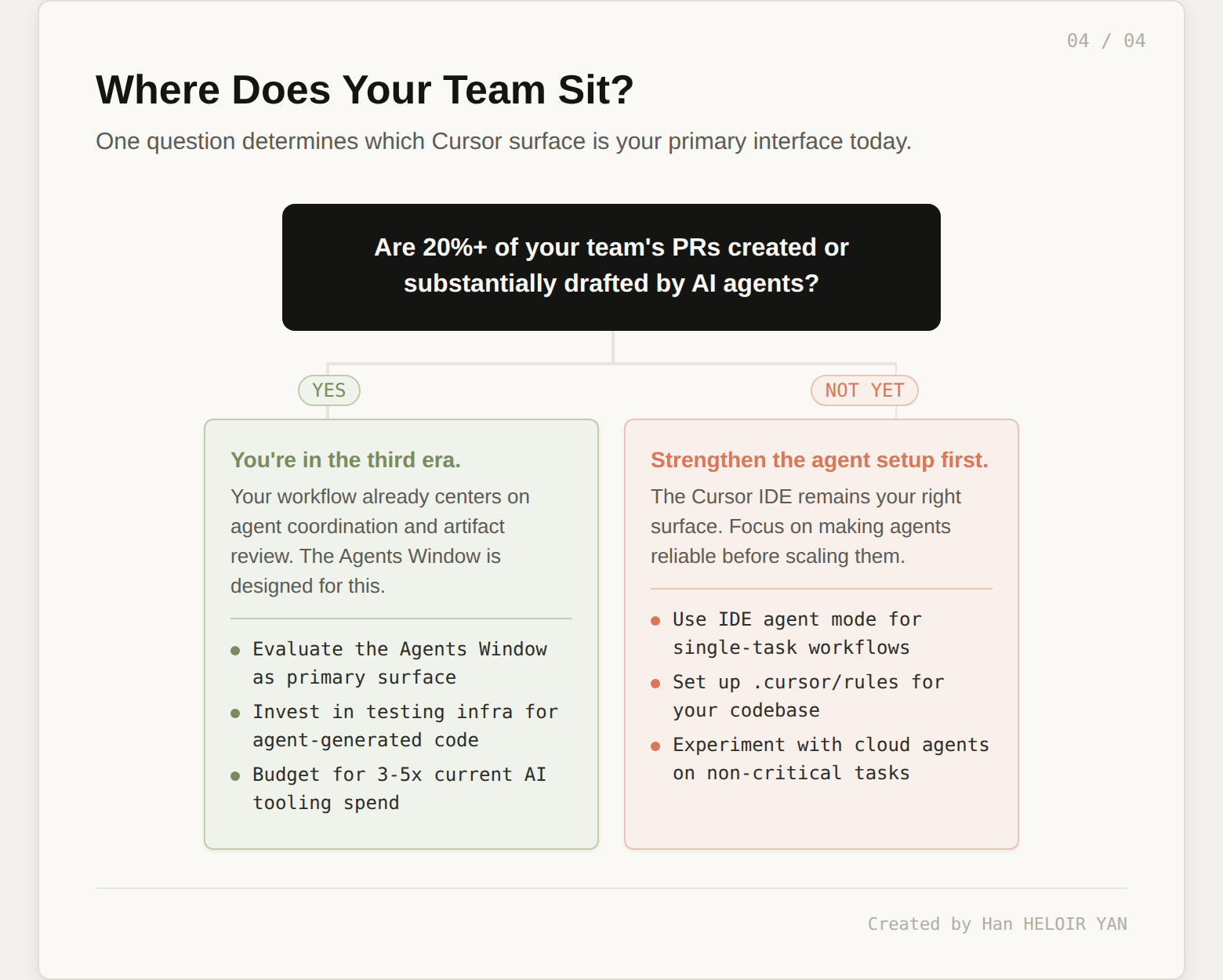
Image by Author — Where does your team sit today? The answer determines which Cursor surface is your primary interface.
The uncomfortable prediction: within 12 months, the distinction between "AI IDE" and "agent orchestration platform" collapses. Every tool in this space is headed toward the same destination through different doors. Cursor is just the first to ship both surfaces and let developers choose.
Try this experiment this week: open the Agents Window, run three agents in parallel on your current project (one feature, one bug fix, one refactor), and time how long you spend reviewing their output versus how long those tasks would take you to do by hand. The ratio tells you which era you're in.